Table of Contents
ToggleSetting up a home office with a standing desk isn’t just about jumping on a trend, it’s about creating a workspace that adapts to the user’s needs throughout the day. AMQ standing desks have become a go-to choice for professionals and DIYers looking to upgrade their workspace without very costly or sacrificing quality. These height-adjustable workstations combine commercial-grade engineering with residential-friendly aesthetics, offering a middle ground between big-box budget models and high-end executive furniture. Whether someone’s assembling their first standing desk or upgrading from a fixed-height workstation, understanding what AMQ brings to the table makes the investment smarter.
Key Takeaways
- AMQ standing desks are built with commercial-grade 14-gauge steel frames and dual-motor systems rated for 220–250 pounds, offering superior stability and durability compared to budget models.
- The Activ and Boost series provide flexible height adjustments (24–50 inches) with programmable presets and anti-collision sensors, making it easy to switch between sitting and standing positions throughout the day.
- Proper setup and customization—including monitor arms, anti-fatigue mats, keyboard trays, and cable management—are essential to maximize comfort and productivity with an AMQ standing desk.
- A 10–12 year warranty and minimal maintenance (monthly cable checks, quarterly preset verification, and annual lubrication) ensure long-term reliability, making the investment worthwhile for home office professionals.
- Assembly typically takes 90 minutes to 2 hours with two people, and careful attention to frame positioning prevents common issues like wobbling or front-heavy balance at standing height.
What Makes AMQ Standing Desks Stand Out in the Market
AMQ designs its standing desks specifically for commercial contract use, which means they’re built to handle daily adjustments and extended use cycles that would wear out consumer-grade models. The frames typically use 14-gauge steel construction, a step up from the 16- or 18-gauge steel found in budget competitors. This translates to less wobble at higher desk positions, a common complaint with lighter frames.
The lifting mechanisms in AMQ desks use dual-motor systems rated for 220 to 250 pounds of load capacity, depending on the model. That’s enough to support multiple monitors, a full-size desktop computer, and peripherals without straining the motors. The motors themselves operate at roughly 35 to 40 decibels, quieter than a standard conversation, which matters in shared home office spaces.
AMQ also provides programmable height presets on most models, usually three or four memory positions. Users can save preferred sitting and standing heights (typically ranging from 24 to 50 inches from the floor), then switch between them with a single button press. This eliminates the guesswork that causes many people to abandon standing desks after a few weeks.
One practical advantage: AMQ desks ship with anti-collision sensors that stop the desk if it encounters resistance during height adjustment. This prevents damage to equipment or the desk itself if someone forgets to clear cables or items underneath. It’s a small detail that saves headaches during daily use.
The warranty coverage reflects commercial intent, typically 10 to 12 years on frames and motors, compared to the 3- to 5-year coverage common on residential models. That extended coverage assumes regular use in office environments, so home users can expect the desks to last considerably longer under lighter duty cycles.
Top AMQ Standing Desk Models for Home Offices
AMQ offers several product lines, but two series dominate home office installations: the Activ and Boost models. Each addresses different workspace needs and budget considerations.
AMQ Activ Series
The Activ series emphasizes clean aesthetics and straightforward functionality. Desktop options include laminate, veneer, and solid wood surfaces in widths from 48 to 72 inches and depths of 24 to 30 inches. The 30-inch depth works well for users who need space for document stacks or reference materials alongside monitors.
Activ desks use a two-stage lifting column system that raises and lowers at approximately 1.5 inches per second, fast enough to be convenient but slow enough to keep coffee cups stable. The control panel mounts on the underside of the desktop or on the front edge, depending on preference. Underslung controls keep the desktop cleaner but require users to duck their head to see the display: front-edge controls are more visible but take up surface real estate.
Cable management in the Activ series includes a horizontal trough that runs the length of the desk frame. It’s deep enough to handle multiple power strips and cable bundles, though users will likely want to add velcro straps or cable clips to keep everything organized during height changes. Some assemblers skip this step and regret it when cables snag during the first adjustment.
The Activ series supports optional modesty panels and privacy screens, useful for video calls or shared home office spaces. These accessories attach to the frame with standard mounting hardware and don’t interfere with the lifting mechanism.
AMQ Boost Series
The Boost series targets users who prioritize customization and advanced features. It shares the same motor and frame engineering as the Activ line but adds more desktop finish options and accessory compatibility. Boost desks accommodate desktop widths up to 84 inches, giving users room for ultra-wide monitor setups or dual-workspace configurations.
One key difference: Boost models offer curved desktop options that wrap slightly around the user. This design reduces reach distance to items at the desk edges, helpful for anyone with shoulder or back issues. The curve isn’t dramatic, but it makes a noticeable difference over an 8-hour workday.
Boost desks include USB-A and USB-C charging ports integrated into the control panel on most configurations. This eliminates the need to route device charging cables all the way to wall outlets or power strips under the desk. The ports deliver 2.4 amps per USB-A and 3 amps per USB-C, sufficient for phones and tablets but not for laptop fast-charging.
Both series work with third-party monitor arms and desk accessories that use grommet or clamp mounting systems. The desktop thickness (typically 1 inch) accommodates standard mounting hardware without requiring modifications.
Installation and Setup: What to Expect
AMQ standing desks ship in multiple boxes, usually two to four, depending on desktop size. The largest box contains the desktop surface and typically weighs 60 to 90 pounds, so plan for a second person during unboxing and assembly. The frame components ship separately and weigh another 50 to 70 pounds.
Before starting assembly, let all components acclimate to room temperature for 24 hours if they’ve been stored in a garage or delivered in extreme weather. Laminate and wood surfaces can warp or crack if assembled immediately after temperature changes.
The assembly process requires basic tools: a Phillips screwdriver, Allen wrenches (usually included), and optionally a power drill with a Phillips bit to speed up the process. Set aside 90 minutes to 2 hours for first-time assembly. Experienced builders can finish in under an hour.
Key assembly steps:
-
Attach the lifting columns to the frame crossbar. The columns are pre-wired, but double-check that connectors are fully seated before tightening mounting bolts. Loose connections cause the desk to raise unevenly.
-
Mount the frame to the desktop. Flip the desktop upside down on a clean, padded surface (moving blankets or cardboard work well). Position the frame so it’s centered side-to-side and set back 2 to 3 inches from the front edge. This offset prevents the desk from feeling front-heavy at standing height.
-
Connect the control box. The controller mounts to the underside of the desktop or inside the cable trough. Route motor cables to the control box and plug in the power supply. Don’t power on the desk yet.
-
Install the desktop. With help, flip the desk upright and position it in the workspace. Wear work gloves, the frame edges are sharp and can slice hands during maneuvering.
-
Initialize the system. Most AMQ desks require a calibration cycle on first power-up. The desk will lower to its minimum height, then raise to maximum, then return to mid-range. Don’t interrupt this process.
Common installation mistakes: mounting the frame too far forward (makes the desk tippy), forgetting to tighten all frame bolts before flipping the desk upright (causes squeaks and wobbles later), and not leaving clearance behind the desk for cables during height changes (cables get pinched or pulled out).
Standing desks don’t typically require permits for installation, but if someone’s planning to hardwire the desk into building electrical (rather than using the included plug), that modification may require inspection depending on local code. Most users stick with the standard plug configuration.
Customizing Your AMQ Standing Desk for Maximum Productivity
Out of the box, AMQ desks function fine, but a few targeted modifications make them significantly more useful for daily work.
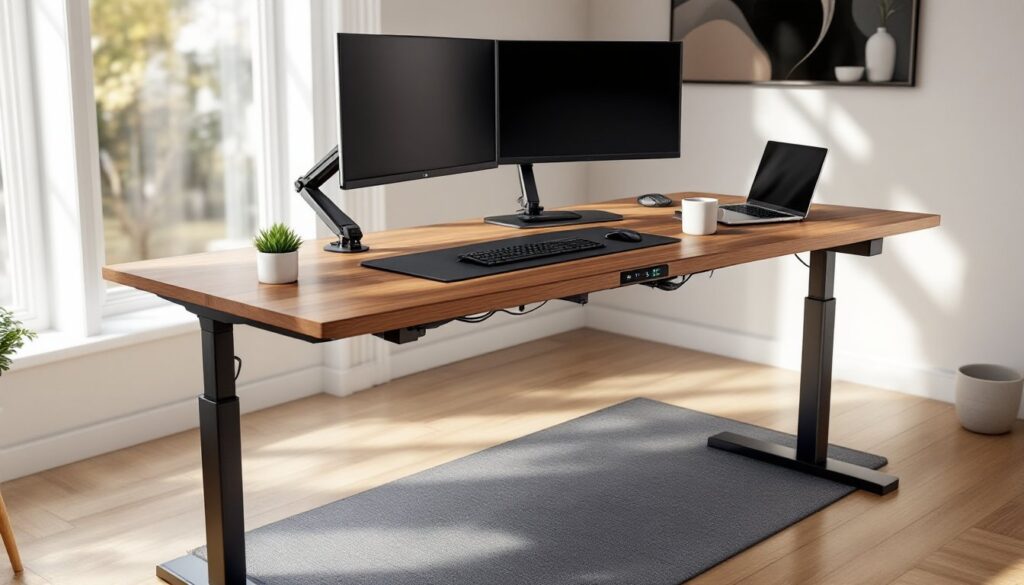
Monitor positioning matters more at standing height than sitting. Most people need monitors 20 to 28 inches from their eyes when standing, with the top of the screen at or slightly below eye level. Standard monitor stands often sit too low for standing use. A height-adjustable monitor arm solves this, look for arms with VESA 75mm or 100mm mounting patterns and weight capacity matching the monitor size. Gas-spring arms allow quick adjustments between sitting and standing positions without tools.
Anti-fatigue mats are non-negotiable for standing desk use. Standing on hard flooring for extended periods causes foot, knee, and back fatigue within 30 to 45 minutes. A 3/4-inch thick foam or gel mat provides enough cushioning without being so soft that it becomes unstable. Avoid mats with aggressive surface textures, they’re uncomfortable through socks or light shoes.
For users considering standing desk conversions as DIY alternatives, AMQ’s commercial-grade construction offers reliability that basic IKEA hacks can’t match, though budget-conscious builders can achieve functional results with gas springs and patience.
Keyboard tray installation helps maintain neutral wrist position at different desk heights. The tray should mount so the keyboard surface sits 1 to 2 inches below elbow height when the user’s arms hang naturally at their sides. Most aftermarket trays use clamp or grommet mounts and adjust for tilt and height. Avoid trays that only slide in and out, vertical adjustment is critical.
Cable management upgrades keep cords from snagging during height changes. The built-in trough handles most cables, but adding a cable spine (a flexible vertical conduit) between the desktop and floor prevents power cords and network cables from pulling taut at maximum desk height. Under-desk cable clips route cables along the frame and prevent them from hanging loose where they’ll catch on chair arms.
Desktop accessories to consider: document holders that clamp to monitor arms (keeps reference materials at eye level), magnetic cable drops that catch charging cables when not in use, and small drawer units that mount under the desktop for storing frequently used items.
Anyone working with specific tools or equipment should verify weight distribution across the desktop. Heavy items positioned at the front edge can create balance issues at full standing height, especially on desks at the upper end of the width range. Center heavy equipment or position it toward the back third of the desktop.
Maintenance Tips to Keep Your AMQ Desk Performing Like New
AMQ standing desks require minimal maintenance, but a few routine checks prevent common issues.
Monthly tasks:
• Inspect cable routing. Check that cables haven’t worked loose from management clips and that nothing’s hanging low enough to catch during height adjustment. A snagged cable can damage equipment or trip the anti-collision sensor repeatedly.
• Tighten frame bolts. The lifting mechanism creates slight vibrations during operation. After the first month of use, check all frame connection bolts and snug them up. Use the Allen wrench included with the desk, power tools can over-torque the fasteners.
• Clean the lifting columns. Dust and debris can accumulate on the telescoping columns. Wipe them down with a dry cloth or use a vacuum with a brush attachment. Avoid getting moisture inside the columns.
Quarterly tasks:
• Test the anti-collision feature. Place a phone book or similar object under the desk and lower it until it contacts the book. The desk should stop immediately. If it doesn’t, check the control box manual for sensor adjustment procedures.
• Verify memory presets. Over time, presets can drift slightly. Re-save preferred heights if the desk isn’t stopping exactly where expected.
• Inspect the desktop surface. Laminate desktops can develop edge chips if items are dragged across them. Touch up minor damage with furniture markers that match the finish color. Veneer and solid wood surfaces may need occasional conditioning with appropriate wood care products.
Annual tasks:
• Lubricate moving parts. AMQ desks use sealed bearings that don’t require regular lubrication, but if the desk develops squeaks or rough spots during movement, a small amount of dry silicone lubricant on the lifting column slides can help. Don’t use oil-based lubricants, they attract dust.
• Check motor balance. If the desk tilts to one side during height adjustment, the motors may be out of sync. Most AMQ control boxes have a reset procedure that re-syncs the motors. This usually involves holding down specific buttons while cycling the desk through its full range of motion. Consult the user manual for the exact procedure.
What to avoid:
• Don’t exceed the rated weight capacity. Overloading the desk strains motors and reduces lifespan. If someone needs to temporarily place heavy items on the desk, lower it to sitting height first.
• Don’t adjust the desk with significant lateral force applied (leaning heavily on one side while it’s moving). This can bend the lifting columns over time.
• Don’t use harsh chemical cleaners on the desktop or frame. Mild soap and water handle most cleaning needs. For stubborn marks, isopropyl alcohol works on most finishes.
If the desk develops mechanical issues during the warranty period, contact AMQ’s service department before attempting repairs. Opening the motor housing or control box voids most warranties. Simple fixes like replacing the control panel or power supply don’t require professional help, but motor or frame problems should go through warranty channels.
For those comparing options, current standing desk reviews consistently rank commercial-grade models higher for longevity and daily-use reliability, making the upfront investment worthwhile for serious home office setups.